Make a stamp background transparent
Remove the paper around a company stamp so the ink can sit over another document without a white rectangle. Upload a clear stamp image or a cropped PDF and save the stamp as a transparent PNG.
US$7.99 per upload · Final results after payment · No subscription
A real stamp recovered from an overlapping signature
A real test from the studio
From one photo to two separate images
A handwritten signature crosses a company stamp on lined paper.
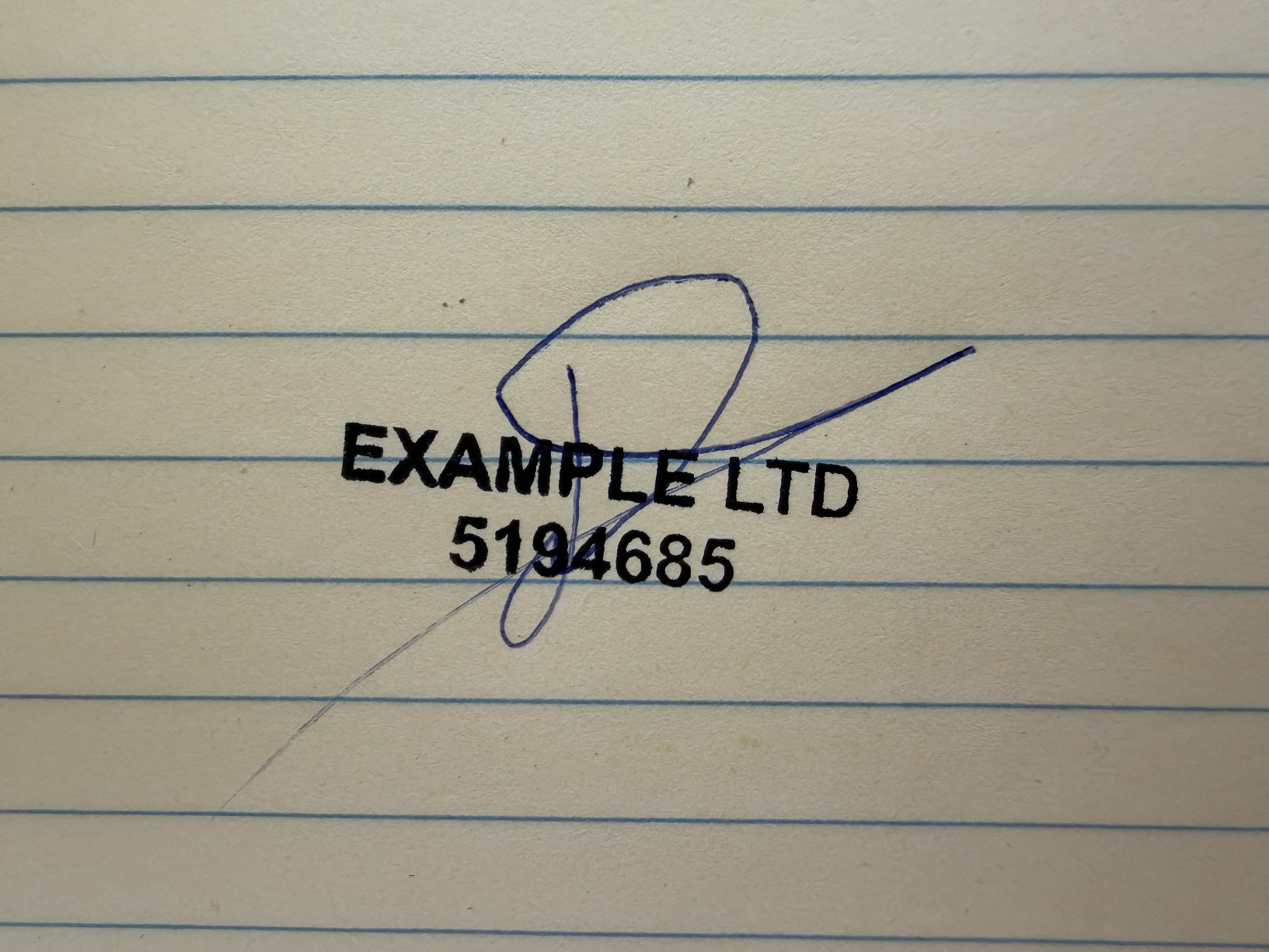

The lined paper and handwriting have been removed from the stamp result. The checkerboard on this page shows transparent space; it is not part of the stamp PNG. Covered stamp characters remain estimates.
Actual completed results from the same upload, shown upright, with the stamp’s text rows leveled. Reconstructed strokes are estimates; compare lettering and handwriting with your original. Images are fitted to each panel for visibility.
How to remove the background from a stamp
- Choose a sharp, evenly lit photo or scan that includes the whole stamp. If possible, start with a stamp impression on plain paper.
- Open the studio, sign in, and upload a JPEG, PNG, WebP, or PDF up to 20 MB. For a PDF, select the page and crop the stamp area.
- Review the censored estimate. Unlock the upload for US$7.99; final processing begins after payment.
- Compare the stamp border and lettering with the original. Adjust the ink color or tilt if needed.
- Download the stamp PNG and place it over a colored background to check the transparency.
Keep PNG transparency when using the result
PNG stores the opacity of each pixel. Fully transparent pixels let the document beneath show through, while partially transparent pixels can preserve softer ink edges.
Keep the downloaded PNG file when moving it between apps. A screenshot or JPEG export can flatten it onto an opaque background. If you see a checkerboard in your image viewer, it may simply be the viewer’s transparency display. Test the original PNG over a colored shape in your document editor.
Fix the source before removing more ink
| What you see | What to do |
|---|---|
| Gray paper or a shadow remains | Retake the photo in even light with the camera parallel to the page. A strong shadow can look like faint ink. |
| Thin letters disappear | Use a sharper, larger source. Aggressively removing pale pixels can erase light stamp impressions along with the paper. |
| A white halo surrounds the stamp | Check the original downloaded PNG on a contrasting background. If the edge is still opaque, try a clearer crop with less paper shading. |
| Handwriting crosses the letters | This is an overlap problem as well as a background problem. Use a crop containing both marks and compare the separate results carefully. |
When the stamp includes a signature
Removing the page background does not by itself separate a signature from the stamp. Include both complete marks so the studio can prepare separate images. If the handwriting hides a letter entirely, a clean stamp impression is the best reference for that letter.
See the signature and stamp separation example or follow the company stamp PDF guide.
Stamp transparency questions
Can the stamp keep its original ink color?
Yes. Leave the color option at Original when you want to keep the recovered ink appearance. Recovery may still change hidden or blurred details, so compare it with the source.
Can I download a transparent JPEG?
JPEG does not support transparency. Use the PNG download to keep the background transparent.
Is the result a vector stamp?
No. The result is a raster PNG. Increasing its size substantially can make the edges look soft. Start with a high-quality source at a useful size.
What does a stamp download cost?
US$7.99 unlocks one upload’s final signature and stamp results when present. There is no subscription; view pricing.